Langmeier Backup
Reality check: How important is data backup really?

This is how important data backup really is. An inventory.
Why do you need a data backup?
It can happen at any time: A crash on the hard disk and nothing of what was there before exists anymore. In the event that this happens, you should take appropriate preventive measures. The most important protective measure is to create a data backup.
Essential: A proper data backup involves more than just copying files. For example, what good is a backup in the rare event that your business or workplace is the victim of a fire and your backup hard disk in the drawer of your desk is also burnt: there is only a low probability, but the damage is all the greater!
Read on and learn how to back up data professionally and correctly. Make these methods your own, regardless of whether you back up your data with our award-winning Langmeier Backup software or use other software. However, we have integrated much of what is described here into our backup software, which will help you not to forget anything important in the data backup process.
Why is data backup essential?
If you do not protect yourself and do not create a backup, you can expect a total loss. Most people will not hire a data recovery company to recover the undamaged data from the disk, as data recovery can quickly cost thousands of euros. Even then, there is no guarantee that all data can be recovered. Take the first step today and protect yourself from potential data loss.
Here you can familiarizeyourself with data backup with Langmeier Backup and test our data backup software free of charge and without obligation for 30 days before you decide to buy.
The most important measure is to carry out regular data backups. Once you have installed Langmeier Backup and set up the backup, we recommend that you at least familiarize yourself with the 3-2-1 data backup rule so that you have carried out your backup correctly and securely.
What reasons can lead to data loss?
Everyone hopes it won't happen, but it can happen to anyone: The hard drive fails. Every summer in the hot months it happens to some users, because hard disks are particularly vulnerable in hot weather. Hardware failures are often caused by age-related damage to the disk's read and write mechanism. Enormous heat can cause the material to bend and the read/write head to hit the disk - the dreaded hard disk crash.
During a local thunderstorm, a power surge could destroy the data on the hard disk. Moving the hard disk during operation can also cause a hard disk crash. Malicious computer viruses can cause data loss by deleting or modifying files on your computer. Intrusive hackers also often delete your data.
Human error on the part of the computer user also often leads to data loss: a file that is actually still needed is deleted. Errors that can occur in software used on a daily basis should also not be underestimated: Software errors can destroy documents.
Companies
Backup solutions for companies
Data loss has serious consequences for companies. The loss of data can have an enormous economic impact, even though such damage could be avoided with relatively little effort.
Langmeier Software offers backup solutions with selected special functions for small and medium-sized companies as well as for larger corporations. However, there are some important technical differences here, which can also be easily overcome with the help of the comprehensive software packages.
Even smaller companies often have one or more servers on which important data is stored. This includes mail servers or special databases, for example, but also the content of software solutions such as CRM or ERP systems. Even if the servers fail, this data must not be lost under any circumstances. At the same time, it is important that the backups are just as secure against unauthorized access as the original data.
Langmeier Backup Business combines these advantages and ensures perfect protection against data loss with 256-bit encryption and optional data backup in the form of compressed and manufacturer-independent zip archives.
In addition, Langmeier Backup Server can be used to back up not only physical but also virtual environments.
Legal requirements regarding backup for companies
Accounting and other tax-relevant documents must be backed up and be available to any auditors at all times. There is also a legal archiving obligation for certain documents, although archiving is not the same as data backup. Read the article "Data backup in IT baseline protection", which will help you not to forget anything in your company when it comes to data backup.
Private individuals
Backup solutions for private individuals
It is a great pity if you lose photos, music or other personal data stored on a hard disk due to technical errors or other reasons.
Langmeier Backup Professional is ideal for demanding private users.
It allows you to synchronize your valuable data in real time or create a backup at regular intervals while the Windows operating system is running. As mentioned at the beginning, the software also makes it easier for you to back up your data professionally and to create more than just copies, for example by allowing you to easily follow the 3-2-1 backup rule already mentioned.
The Langmeier Backup program can also save your e-mails, contact data and other things. Take the time to set up your backup correctly at the beginning and from then on you will have the good feeling that things such as emails or contacts, which are otherwise easily forgotten, are also backed up.
If your computer is attacked by a virus or if the data was no longer accessible for other reasons, you can now fall back on the comprehensive data backup and restore all data to the repaired computer.
Things to know about data backup
Backup best practice: What is a good data backup?
If you have created a good data backup, then you can answer the following questions with yes without exception:
Have you followed the 3-2-1 backup rule?
For companies: Have you created a data backup concept?
Are you familiar with all data backup types and backup methods?
Do you know which data belongs in your data backup and which does not?
Do you know which backup medium is best suited to your data backup needs?
Basically: What is a backup? It's explained here.
Data backup concept
Decide what kind of backup medium you are going to use. Configure your data backup on Langmeier Backup in a way that suits you: The backup could be started every week on Friday morning or whenever you connect your hard disk with a specific name. There are countless possibilities.
Data backup types or backup methods
Get to know the technical backup terms generation concept, incremental backup or differential backup and full backup and decide which is best suited to your situation.
Document in writing what you have decided on. Perhaps you will discover an option that you were not even aware of, but that suits your data backup needs? If you are the managing director of a company, make a note of who is responsible for data backup, etc.
You can read all about the data backup concept in detail here.
Don't forget to periodically test the recovery of the data. If you make a file backup, go to the hard disk from time to time and check whether all files have been backed up correctly and can be opened. Check the logs of your data backups from time to time - or preferably always.
But what about a Windows backup where you have created a hard disk image? Do you know how you would restore an operating system image in an emergency? We have explained it here for Langmeier Backup.
What belongs in the backup and which data should be backed up?
This question sounds much simpler than it is. You will say: All my data or all our data. But where is it stored? Do you also want to back up your emails? What about your contacts? Have you also thought about your web browser favorites? With Langmeier Backup you can simply back them up directly in the data backup job or you can export the favorites regularly and make sure that these exported files are backed up.
In the document "Which data do you back up with your data backup program?" we have compiled everything you need to know.
How else can you protect your data in addition to data backup measures?
You should always unplug your computer during thunderstorms and not use it during local storms, as a lightning strike in a power line can lead to an overdose of electricity for the computer and thus cause data loss.
Do not expose your computer to direct sunlight. In summer, it is advisable to use the computer in a cooled room or next to a fan. When using your computer on the first floor or in the basement, always place it on a table to protect it from possible flooding.
Which backup medium should you use?
The first thing you need to think about is where you want to back up data to. When backing up data to CD or DVD, the storage capacity is low in contrast to the local hard disk. You should therefore opt for this method if you are not backing up too much data.
An increasingly popular data backup method is backing up data to an external hard disk. The big advantage of backing up to an external hard disk is obvious: the storage capacity can be as high, or even higher, than that of the local hard disk. Data backups can also be triggered automatically without the user having to do anything. The disadvantage is that an external hard disk can also suffer a disk crash, which means that hard disks have to be replaced every few years.
We have compiled a comprehensive list of all possible backup media for your data backup here. The online options are also included.
Create data backups automatically or manually?
We leave it up to you to decide which you prefer. An automatic data backup has the advantage that it cannot be forgotten. The advantage of a manual backup is that you have full control over when you back up your data.
Programs, including backup programs, are often automatically activated as a service without the user's knowledge and block resources. As a result, PCs become slower. But why are there backup programs that leave their programs running in the background all the time, even if no automatic data backup is set up? Each manufacturer must answer this question for themselves. At Langmeier Backup, we let you decide whether and when it should run in the background.
Many users want to start the data backup manually. So that they always have an overview of running programs and are sure which tools are active. It is clear that in this case it is unnecessary for the data backup application to run in the background. That is why Langmeier Backup is programmed to run in the background only if the user wants to run automatic data backups.
Data backup when system is active or inactive
With Langmeier Backup you have both options.
If your system is active, it is a normal data backup that you initiate yourself.
If the system is inactive, nobody is logged on and you want to run the data backup during this time, you must run Langmeier Backup as a Windows service.
One of the criteria that you could select to start a data backup is "work break", e.g. 15 minutes. If no one has been working on your computer or system for 15 minutes, the data backup will start automatically and Langmeier Backup will carry out its work.
All details on running Langmeier Backup as a Windows service can be found here.
Backing up Microsoft Outlook data
Backing up Microsoft Outlook emails is child's play with Langmeier Backup. This article explains how to do it and answers in detail which Outlook elements are backed up in addition to the emails in the Outlook backup and also lists the few that cannot be backed up for technical reasons. For example, you must ensure that you save your email signatures separately so that they are still available after a data loss or when switching to a new computer.
Backing up Mozilla Thunderbird data
Backing up emails from Mozilla Thunderbird with Langmeier Backup is extremely easy. Read right here how the Thunderbird backup works:
Click on the "Add" button in the job and select the "Email and Internet Favorites" entry as the source.
The following wizard appears:
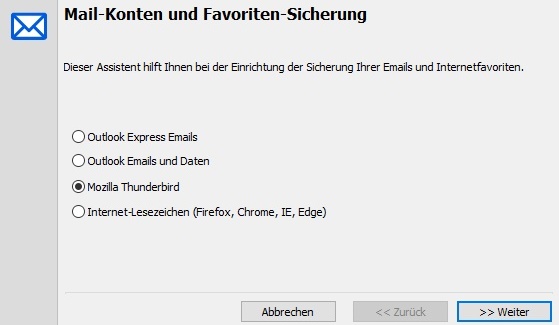
Select "Mozilla Thunderbird".
If you also want to save your favorites, simply call up the same wizard a second time and save them at the same time in future.
Do you still have questions?
Carry out your personal backup software test. If you have any questions about the functionalities of Langmeier Backup, feel free to contact us at any time using one of the options listed on our support page.


 Brochure