Langmeier Backup FAQ

How can I create a Windows image backup? (In the year 2025)

If you want to create a backup of the entire Windows operating system, you need an image. An image is nothing more than a bit-perfect image of the hard disk. Fortunately, creating a Windows image backup is very easy with Langmeier Backup.

Create a Windows image backup

  1. Start the "Setup" wizard.
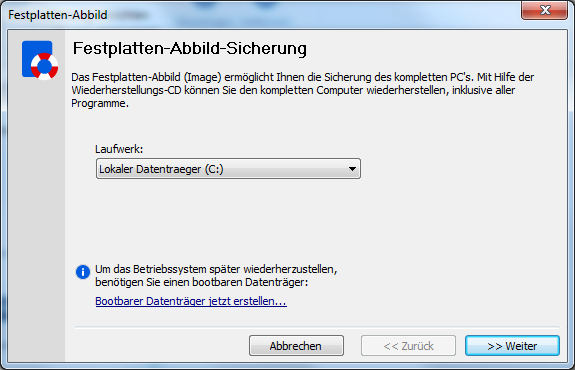
  2. Select "Add" and then "Hard disk image...".
  3. In the window that appears, select the drive on which your operating system is located (usually the C:\ drive).
    Was, wenn Ihr Computer oder Laptop nicht mehr startet? Sorgen Sie vor und erstellen Sie mit Langmeier Backup ein Windows Image Backup.
  4. Click on ">> Next".
  5. If you wish, give the image a name other than the one suggested and select "Finish".
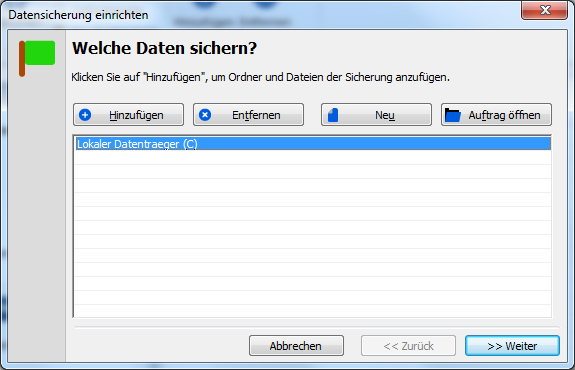
  6. Your hard disk is now displayed in the list of data to be backed up.
    Was, wenn Ihr Computer oder Laptop nicht mehr startet? Sorgen Sie vor und erstellen Sie mit Langmeier Backup ein Windows Image Backup.
  7. Press ">> Next".
  8. Select "Local (e.g. to external hard disk, USB stick, etc.)" or "To network" as the destination.
  9. Press ">> Next".
  10. Click on "Select..." and select a destination folder for the data backup.
  11. Click on ">> Next".
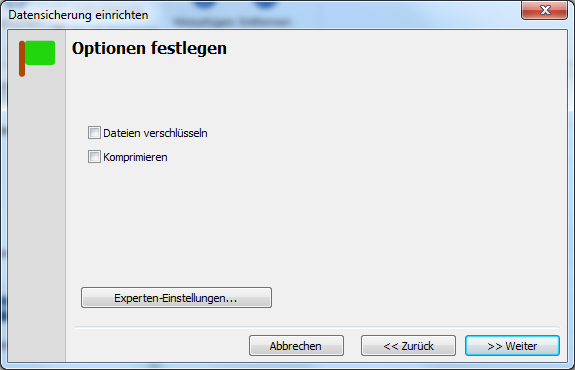
  12. Select the desired options, e.g. whether the image should be encrypted.
    Was, wenn Ihr Computer oder Laptop nicht mehr startet? Sorgen Sie vor und erstellen Sie mit Langmeier Backup ein Windows Image Backup.
  13. Under "Expert settings" you will find further options, e.g. a notification by e-mail after each data backup.
  14. Click on ">> Next".
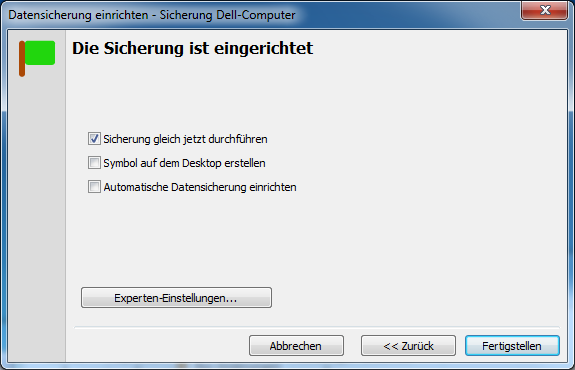
  15. Enter a name for the backup, e.g. "Backup Dell computer".
  16. Click on ">> Next".
  17. Click on "Perform backup right now".
    Was, wenn Ihr Computer oder Laptop nicht mehr startet? Sorgen Sie vor und erstellen Sie mit Langmeier Backup ein Windows Image Backup.
  18. Click on "Finish" and wait until the Windows backup is complete. In the meantime, you can continue to work on your computer (as long as you do not shut it down).

Compatibility with the different Windows versions

Can a Windows backup or image be performed with any version of Windows? The short answer is yes. To confirm this, here is a brief overview to dispel any doubts.

Image backup in Windows 11

You can create a Windows 11 image backup with Langmeier Backup.

Create an image in Windows 10

You can create a Windows 10 backup or image with Langmeier Backup.

Create a Windows image backup in Windows 8.1

With Langmeier Backup you can easily create a Windows 8.1 backup.

Windows 8 data backup

A Windows 8 data backup is also possible with Langmeier Backup.

Backup Windows 7

With Langmeier Backup you can easily create a Windows 7 backup.

Image backup for physical Windows servers

Langmeier Backup also supports image creation under Windows Server.

Create image backup for virtual Windows servers

You can also back up virtual Windows servers with Langmeier Backup. You have the option of creating a bootable ISO file as a rescue medium to restore a virtual server.

Backing up Windows servers under Hyper-V

Under Hyper-V you can back up virtual machines completely by selecting the VHD and VHDX files for backup in Langmeier Backup. These virtual machines can be backed up under Hyper-V during operation and restored to a new VM at any time.

Restore Windows backup

How to restore a Windows image backup? Here you can read how to restore a system backup with Langmeier Backup.

For a worry-free IT infrastructure

Protect your most valuable company data.

  Buy now   Download now Backup program for Windows   Learn more...
About the author
Founder and CEO of Langmeier Software
I don't want to complicate anything. I don't want to develop the ultimate business software. I don't want to be listed in a top technology list. Because that's not what business applications are about. It's about making sure your data is seamlessly protected. And it's about making sure everything runs smoothly while you retain full control and can focus on growing your business. Simplicity and reliability are my guiding principles and inspire me every day.
 
Look it up further:
Langmeier Backup, Image backup, Hard disk image, Backup operating system, Back up Windows
Related articles

This article covers the topics:
Windows Backup
Image Backup
How to create an image