Langmeier Backup FAQ
How to make a tap-proof backup on FTP via SSL
With Langmeier Backup you can also perform an FTP backup and optionally use a secure connection to the server, which can be activated independently of the data encryption by the Langmeier Backup software. The secure connection for data backup is established via SSL (not to be confused with sFTP, which connects to the server via SSH - this type of connection is not supported by Langmeier Backup).
In order for Langmeier Backup to communicate with the server via FTP using a secure connection, select the "Secure connection (SSL)" checkbox in the online backup settings:
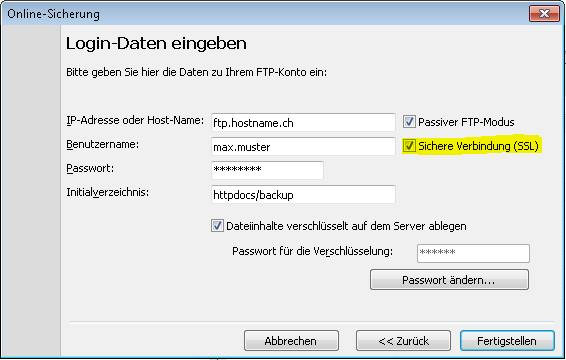
The following table shows the different authentication types that Langmeier Backup can use here.
|
Value (FTPSAuth):
|
Abbreviation:
|
Description:
|
|
0
|
atNone
|
No encryption is used.
|
|
1
|
atSecureData
|
The data is encrypted with SSL.
|
|
2
|
atImplicitControl
|
The control connection is always encrypted with SSL.
|
|
3
|
atImplicitNormal
|
The maximum security setting and the default.
|
|
4
|
atExplicitControl
|
The control connection is encrypted with SSL after an initial login.
|
|
5
|
atExplicitNormal
|
Everything is encrypted after the certificate is sent. This is used by many vendors.
|
|
8
|
atHashLogin
|
Encrypts and salts the password, using 256-bit AES to ensure stronger protection over a clear connection...
|
|
9
|
atFirewallReady
|
Enables Secure FTP communications over a firewall. This will only work in conjunction with a PowerTCP FTP/SecureFTPServer pairing.
|
|
16
|
atExplicitAutoControl
|
Explicit is used if possible; otherwise no encryption is used on the control connection.
|
|
33
|
atImplicitLogin
|
Data and Control connection are encrypted until the user is authenticated, after which the control connection becomes clear text.
|
By default, Langmeier Backup uses the value 5 (atExplicitNormal) for a secure connection. To change this default, proceed as follows.
Press the Windows+R key and run the registry editor Regedit.exe in the window that appears.
Copy the desired value from the table above to the value "FTPSAuth", which you create in the Windows registry as follows:
Create a 32bit numeric value named "FTPSAuth" in the Windows registry under the key:
HKEY_CURRENT_USER - Software - Langmeier Software - Langmeier Backup - Settings
Or, if Langmeier Backup is running as a service under:
HKEY_LOCAL_MACHINE- Software - Langmeier Software - Langmeier Backup - Settings
Or, if Langmeier Backup is running as a service under Windows 64 Bit under:
HKEY_LOCAL_MACHINE - Wow6432Node - Software - Langmeier Software - Langmeier Backup - Settings


 Brochure