
08/14/2023 • Data backup
The importance of image backups and emergency media: your savior in times of need
"An image backup is like an insurance policy for your computer," says founder Urs Langmeier
08/27/2026 • Backup software
Backing Up Microsoft 365 and OneDrive: How to Ensure Your Cloud Data Is Truly Backed Up
OneDrive keeps your files in sync—but that's not a backup. Langmeier Backup backs up your cloud folders with multiple versions.
07/06/2023 • Data backup
How do I back up my data on my PC?
07/03/2023 • PC security
Your PC may be infected - protect yourself now!
04/05/2018 • Magazine
World Backup Day - How to back up your data
06/26/2017 • Langmeier Backup
Security against data loss with Windows Backup
06/08/2017 • Langmeier Backup FAQ
How to protect yourself against ransomware
11/11/2014 • Langmeier Backup
A RAID is not a backup! Here we explain why.
11/04/2014 • Langmeier Backup Magazine
This is how much data loss costs
07/11/2013 • SME data backup
No data loss at remote locations thanks to these tips
06/24/2013 • Langmeier Backup
Act now: Avoid the causes of data loss
08/16/2012 • Langmeier Backup Magazine
What is the value of data?
03/07/2011 • Magazine
Questionable: Only create a backup once a year?
08/27/2026 • Backup software
Backing Up Multiple Drives as Disk Images
If you have multiple hard drives, specify for each job what should be included in the image—and then verify that an image file for each drive is present in the backup destination.
08/05/2023 • IT Security
IT security: Recognizing and countering human error as a security vulnerability
08/27/2026 • Tips and Tricks
Shortcut no longer starts the backup job: Create a new shortcut in Langmeier Backup
If the shortcut only opens the program window, simply move it to a new location in Langmeier Backup: Select the job, then choose "Place shortcut on the desktop."
08/27/2026 • Backup software
What's really inside an image? Recover individual files and properly identify the recovery medium
An image allows you to extract individual files while the system is running. To restore the operating system, you'll need a recovery medium. We'll show you what your image is really capable of.

06/16/2026 • Backup software
Risks of Not Using Backup Software on Windows 11
Find out why backup software is essential for Windows! Protect your data from loss and safeguard against hardware failures, ransomware, user errors, and more. Click here to learn more!
08/27/2026 • Backup software
Backing Up Open Files: How to Include Them in the Backup
Open files are missing from the backup because Windows locks them. You can set up permissions and the service in just a few steps.
09/30/2024 • Langmeier Backup FAQ
Windows 11: Error when switching on memory integrity / core isolation
11/04/2022 • Langmeier Backup FAQ
Langmeier Backup for aBusiness Suite under Windows 7
08/27/2026 • Backup software
What should you do if the checksum in the backup is invalid?
This message protects you from a backup that might be incomplete in the event of an emergency. Four diagnostic steps show where the error lies—and what to do if the storage media are intact.
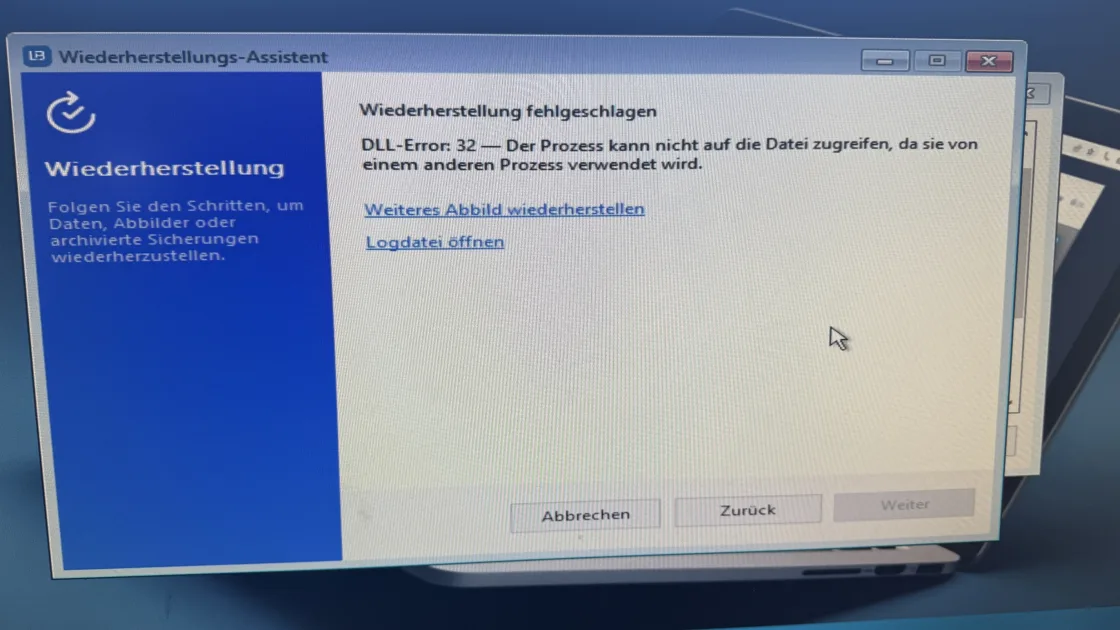
11/16/2026 • Langmeier Backup FAQ
Langmeier Backup: Restoring an entire disk fails on the rescue medium with DLL error 32 - "The process cannot access the file because it is being used by another process"
08/27/2026 • Backup software
Encrypted Cloud Backup: Why the Recovery Strategy Matters
AES-256 reliably protects your backup. The recovery path determines whether you can resume operations after a total failure. You should clarify these points in advance.
08/27/2026 • Langmeier Backup FAQ
Boot the rescue stick: Create a new rescue medium using Langmeier Backup 15
Does the new computer ignore the rescue flash drive? Your backed-up data will remain intact. Here's how to reformat the flash drive to make it UEFI-compatible.
08/27/2026 • Backup software
Restore an image on a new computer: Windows won't start
Windows won't start on the new computer—using the Startup Repair tool gets it running again. The data in the image is complete.
08/27/2026 • Backup software
How to Back Up Virtual Machines on Hyper-V While They're Running
Back up virtual machines running on Hyper-V while they continue to run: with Langmeier Backup V-Flex, either from the Hyper-V server or directly from the individual machine.
08/27/2026 • Tips and Tricks
Migrating to a New Computer: How to Set Up Langmeier Backup Again in Just a Few Minutes
Reinstall the program, and set up the backup job again in just a few minutes. Here's how to migrate to the new Windows computer, step by step.
08/27/2026 • Backup software
Bare Metal Recovery Stalls: Six Steps to Identifying the Cause
If the progress bar stops moving, check the destination partition first—the most common cause can usually be resolved in a minute.

05/10/2026 • Data backup
Which backup software does not create an image? The advantages of a data-based backup
A data backup keeps computers and files safe
04/15/2026 • Backup software
The best backup software is the one you actually use
Find out why the best backup software is the one you really use. Read about what really matters when backing up data for Windows and how you can protect yourself against ransomware.

06/10/2025 • Langmeier Backup
How to Boot Windows 11 from a USB Drive – Instructions 2026
Learn how to boot Windows 11 from a USB flash drive and why it is useful in different situations. Click here to find out more!
09/16/2024 • Langmeier Backup
How to prevent error messages when creating a rescue medium on Windows Server
09/13/2024 • Backing up your data
The role of encryption in backups: Why and how to encrypt your backups
08/30/2024 • Backing up your data
Langmeier Backup V-Flex: Protection and backup of your virtual machines


 Brochure