

Langmeier Backup
Data sheets:

Data sheets:
Contact Langmeier Software
Reseller Partner
About the company
Choose your region
- Europe
- Middle East and Africa
- Australia and Oceania
|
Langmeier Backup FAQ
Windows 11: Error when switching on memory integrity / core isolationMemory integrity, sometimes called "core isolation" or "hypervisor protected code integrity" (HVCI) or "hypervisor enforced code integrity", is a feature added by Microsoft to Windows 11 and is intended for organizations to protect devices with physical access from hardware tampering. The usefulness of this function is controversial among IT experts. If a computer is physically protected from unauthorized access, then this feature does not provide any additional security for a system, but can slow down a computer. Some IT experts therefore recommend deactivating this new Windows function. Some software programs do not support core isolation being switched on. For example, the function for mounting a disk image to a virtual drive in Langmeier Backup is also not available in Langmeier Backup if core isolation is switched on in Windows 11. We recommend the following solutions: Solution 1: Deactivating the core isolation function (recommended)To help you disable the core isolation feature, Microsoft has created a step-by-step guide that shows you exactly how to proceed. You can find these instructions here(external link to Microsoft) Solution 2: Disabling the storage device driverIf you are forced by your organization to leave the core isolation (HVCI) enabled, then alternatively delete the Langmeier Backup Virtual Miniport Disk driver from your Windows system or continue the installation of Langmeier Backup without this driver. You will lose the ability to mount the backup images created by Langmeier Backup. However, file and image backup, file-based restore and image restore from the rescue medium will still be supported. If you want to restore a disk image, you can either do this on a computer without core isolation, or you can restorethe disk image from the rescue media createdin Langmeier Backup. Here are the steps to uninstall the Langmeier Software Virtual Minport Disk driver:
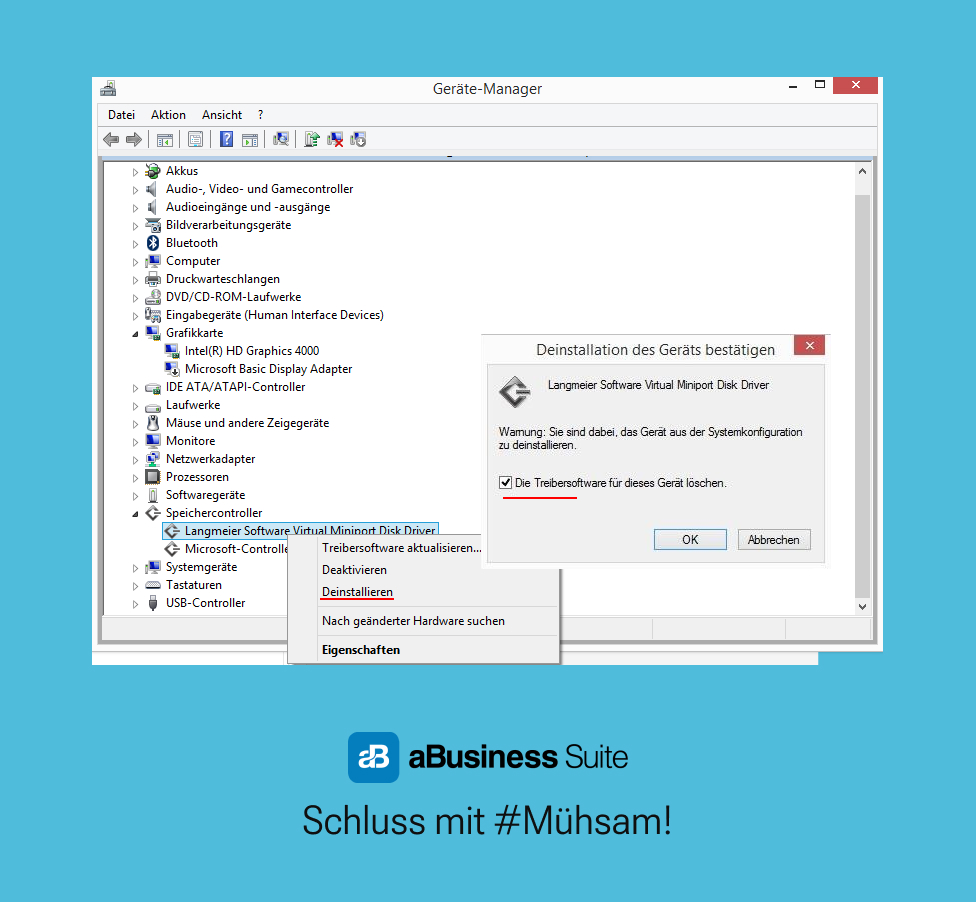 However, as described above, we recommend that you use solution 1, asthe benefit of hypervisor memory integrity for end users is controversial. If your computer is physically sufficiently protected against physical access by third parties, then a computer is also protected against hardware manipulation.
In this case, this function does not provide any additional security for your system, but it can slow down your system. This is why many IT experts recommend deactivating this function in most cases.
If you need help or have further questions, please contact our support team. We also offer telephone or online support to ensure that the deactivation is carried out correctly and that your system is still protected. Look it up further:
Related articles
Post a comment here...
This article covers the topics:Storage integrity / core isolationMicrosoft Hypervisor storage integrity Langmeier backup and core isolation Deactivate HVCI for better performance |
|