Langmeier Backup
Data sheets:

Data sheets:
Contact Langmeier Software
Reseller Partner
About the company
Choose your region
- Europe
- Middle East and Africa
- Australia and Oceania
|
Langmeier Backup
Guide: Avoid these network backup pitfalls If you watch out for a few pitfalls, nothing stands in the way of backing up data to the network. If you watch out for a few pitfalls, nothing stands in the way of backing up data to the network.Backing up data to the internal network, one of the possible backup media, has a few pitfalls that need to be considered. We will show you what you need to watch out for. These tips also apply when using a VPN. These are the most important points summarized:
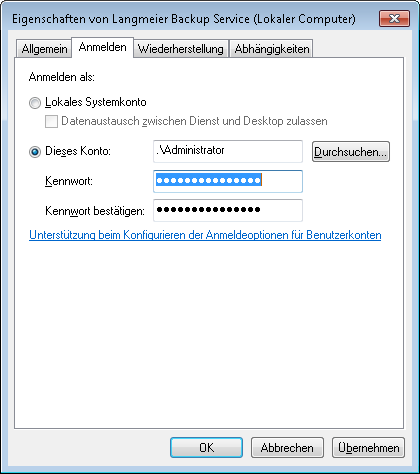
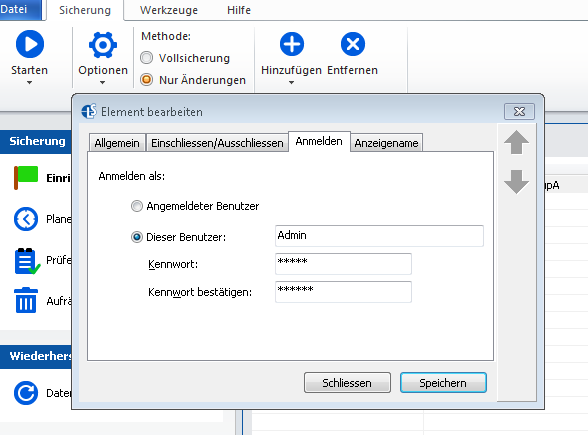
1. Create a user account for the data backup service 2. Store login data for the network resource Is it a network resource to which you have to log in? If so, store the login data in the backup: 3. Be careful with connected network drives such as X:\ Never use a connected network drive such as X:\ for the backup destination. This is because these cannot be accessed via the Windows service as they are not connected there. 4. Use IP address and UNC path The network folders should not be addressed with the DNS name, such as \\Saturn\Backup, but with the help of an IP address in UNC notation: \\192.168.0.7\Sicherung
Look it up further:
Related articlesThis article covers the topics:Data backup to the networkBackup to NAS The pitfalls of backing up to the network Network drives such as X:\ fail during backup |
|