Langmeier Backup FAQ
How to select the right folders for your data backup
Langmeier Backup 9.1 offers several ways in which a data backup can be carried out. One example is the simple 1:1 file copy. Here the user can select file folders to be added to the data backup. Then there is the data backup as a data carrier image. Here, the entire computer, including the operating system and software settings, can be backed up.
In this article, we show you how to select data backup folders individually. This allows the data backup to be adapted to specific company requirements.
The "?" symbol
If a question mark (?) is placed in front of the source path for the backup, this source path is only backed up if it exists. If the path does not exist, no message will appear:
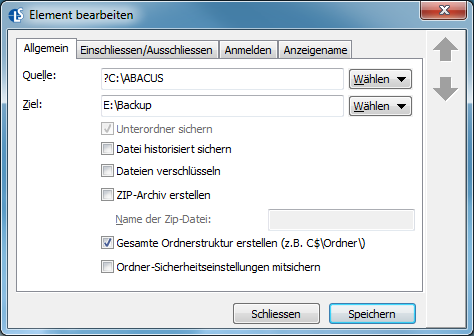
In our example, the folder "C:\ABACUS" is only backed up if this folder exists on the computer. If the folder does not exist, no error message appears thanks to the preceding question mark (?). This is an advantage if you want to deliver the backup job to computers with different software equipment and do not want to annoy users with backup error messages.
Selecting folders using the wildcard character (*)
You have the option of adding data backup folders to the backup as a source using the wildcard character asterisk (*):
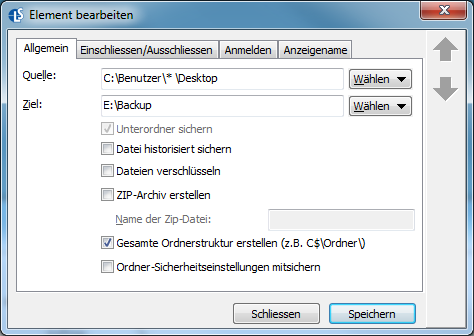
In our example, the desktop of all users on the computer is backed up.
The wildcard asterisk is also useful if you want to exclude folders from the data backup. To do this, go to Options and then Global settings. Click on the "Excluded files and types" button. In the window that opens, select "Add". The "Excluded element" window now appears. Here you define a new element that you want to exclude from the data backup. You can use an asterisk to exclude several folder groups at once:
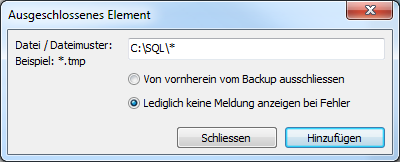
In our example, we have decided not to display any error messages for all files stored under the folder "C:\SQL\" during the data backup .


 Brochure