Langmeier Backup
Data sheets:

Data sheets:
Contact Langmeier Software
Reseller Partner
About the company
Choose your region
- Europe
- Middle East and Africa
- Australia and Oceania
|
Langmeier Backup
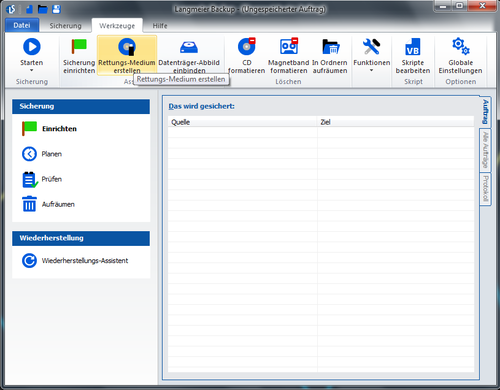
Create a rescue medium with Langmeier BackupIf you want to restore an image of your operating system with Langmeier Backup, you will need a bootable rescue medium. To create this with Langmeier Backup, proceed as follows: 1.click in the menu bar, in the upper part of the main window, on "Tools", "Create rescue medium".
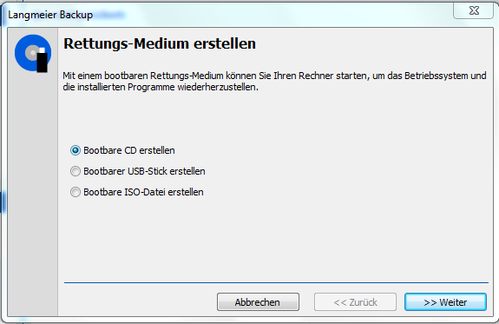
2. you have the following options to choose from: "Create bootable CD", "Create bootable USB stick" or "Create bootable ISO file".
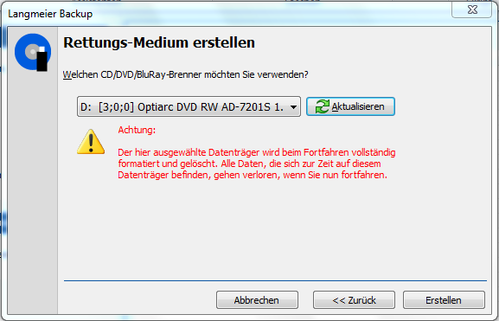
3a. Create bootable CD: Select "Create Bootable CD", click ">>Next", insert the CD, click ">>Next" again , select the CD drive with which you want to burn the ISO file, click "Create". Abootable CD will now be created.
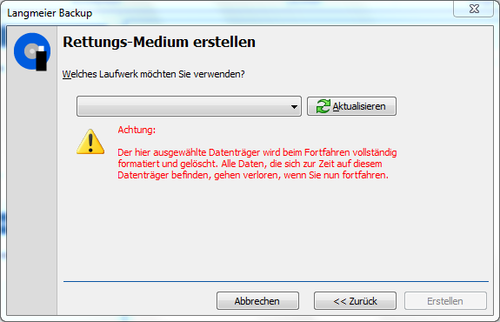
3b. Create a bootable USB stick: Select "Create bootable USB flash drive", click on ">>Next", connect a USB flash drive, click again on ">>Next", select the USB stick on which you want to save the ISO file, click on "Create". Thebootable USB stick will now becreated.
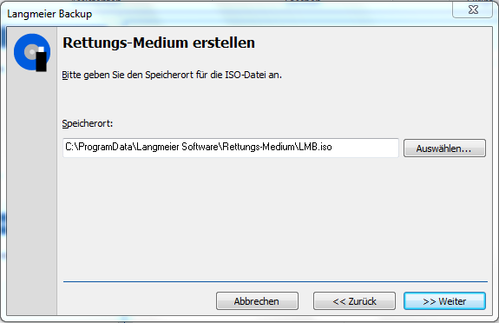
3c. Create bootable ISO file: Select "Create bootable ISO file" click on ">>Next", select the location where you want to save the ISO file, click on ">>Next". The bootable ISO file will now be created.
Note: If you have installed the "Windows Assessment and Deployment Kit (Windows ADK)" on your PC, it will take a little longer to create a rescue medium the first time, as the Windows ADK must be installed first.
Look it up further:
Related articlesThis article covers the topics:Create a bootable CDCreate a bootable ISO file Create a rescue medium Rescue medium |
|